
Simplifying Daily Errands With the 2027 Kia EV3’s Panoramic Display and ccNC Cockpit
September 16 2026,
A quick grocery run, a school pickup, a drive out to see family: most days behind the wheel are made up of small errands, not road trips. In Newfoundland and Labrador, where weather can shift from fog to sun in an afternoon, a cabin that stays easy to read and easy to use matters more than most spec sheets let on.
The 2027 Kia EV3 was built with exactly that kind of day in mind. Its panoramic display and connected software aim to cut down on fumbling through menus while you’re trying to merge, park, or just get the heat right before the kids pile in.
What the Panoramic Display and ccNC Actually Are
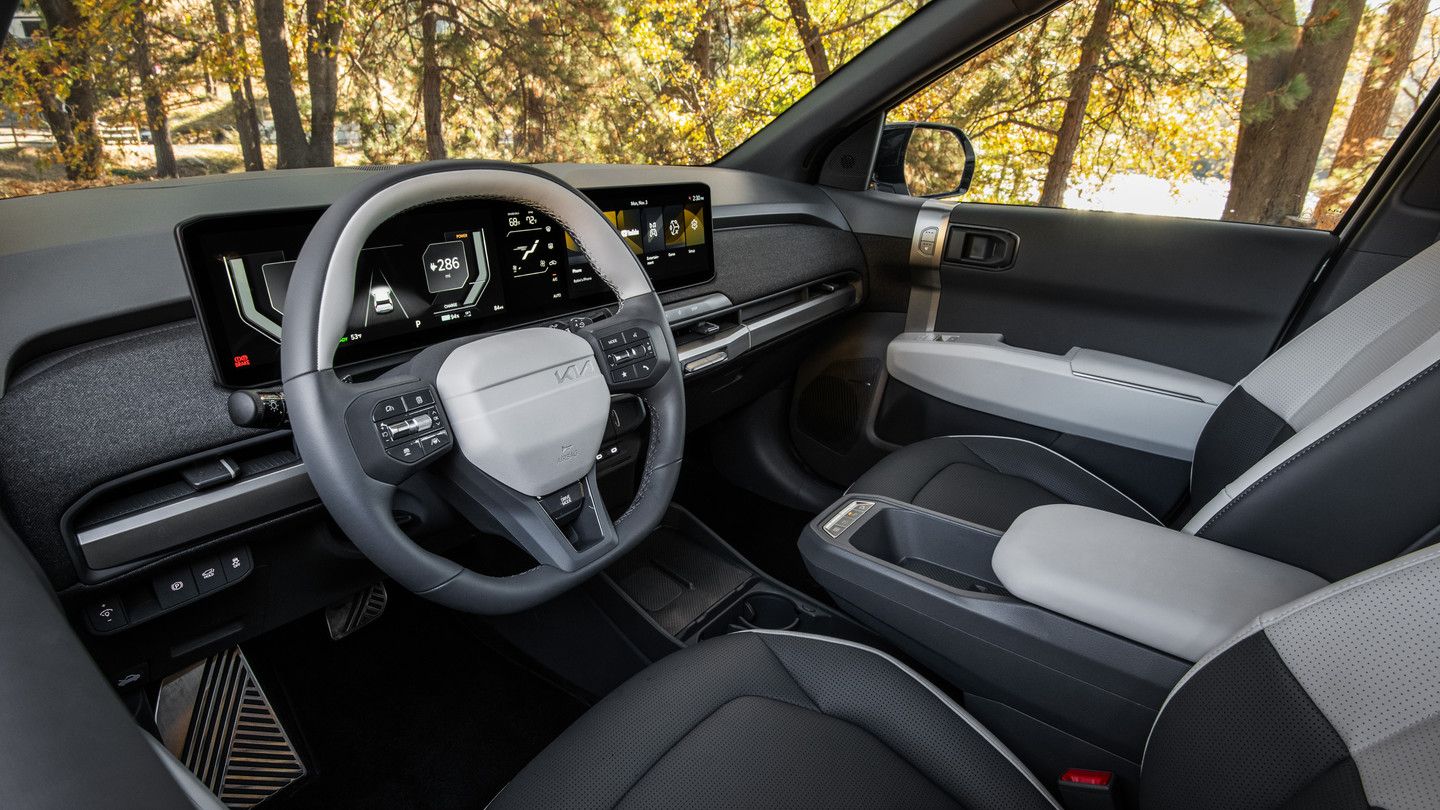
The EV3 comes with a standard panoramic display made up of a 12.3-inch instrument cluster, a 5.3-inch HVAC display, and a 12.3-inch infotainment screen, all arranged across the dash as one connected unit. Together, these three screens form the base of Kia’s connected car Navigation Cockpit, or ccNC.
ccNC is the software layer that ties the driver display, climate controls, and infotainment together instead of treating them as separate systems. It first appeared on the EV9 and now carries into the EV3, giving the smaller SUV the same core in-cabin architecture.
|
Display Element |
Size |
|
Instrument cluster |
12.3-inch |
|
HVAC display |
5.3-inch |
|
Infotainment screen |
12.3-inch |
How It Works Behind the Wheel

The layout keeps drive status, climate, and navigation glanceable rather than buried in submenus. Key functions are grouped together on screen instead of scattered, so adjusting the temperature or checking your route doesn’t mean hunting through multiple pages.
The infotainment screen supports wireless Android Auto and Apple CarPlay, so a phone can pair without a cable every time you get in. Voice-friendly interaction and quick screen access are built to help with fast route changes, useful when a detour pops up or a stop gets added to the list.
Because the system connects through Kia Connect, over-the-air updates keep it current without a trip to the dealership for a manual update. Remote services include door lock and unlock, remote start with climate control, and vehicle status checks such as EV range and charging status, all accessible from a smartphone before you even walk out the door.
Why This Matters for a Busy Day
A display that’s easy to read at a glance reduces the number of times you look away from the road to find a setting. That’s a small thing, but it adds up across a week of errands, work commutes, and weather that can turn from clear to rain in the time it takes to load the trunk.
Remote start with climate control means the cabin can be warming or cooling before you’re in the driver’s seat. Combined with connected services like charge scheduling and battery pre-conditioning, small friction points, a foggy windshield, a cold seat, an uncertain charge level, get handled before they become a delay.
The cabin itself supports the same practical thinking. A rear centre cupholder, easy-reach controls, and 740 litres of cargo space behind the second row give the display-led layout somewhere useful to work alongside. A 25-litre frunk adds a spot for cables or a bag of groceries that would otherwise roll around the back seat.
Who Gets the Most Out of This System
This setup suits someone who wants straightforward EV ownership without a steep learning curve. If you’re new to electric driving, the grouped controls and glanceable readouts mean you’re not relearning how to adjust the heat or check your range every time you get in.
It also fits local driving patterns well: mixed errands around town, short trips between appointments, and weather changes that call for quick climate adjustments. The system is built to handle that kind of routine rather than a single long highway drive.
See the EV3’s Cabin in Person at Gander Kia
The EV3’s panoramic display and ccNC software are built to make daily errands feel less cluttered, with grouped controls, glanceable information, and connected services working together in one cabin. For a driver juggling a busy schedule, that kind of organization can make a real difference.
Visit Gander Kia in Gander to sit in the EV3 and try it for yourself. Check screen readability, menu speed, and how the system responds to a normal route, then test the climate controls, navigation setup, and phone pairing before you decide.
To learn more about the 2027 Kia EV3, visit Kia.ca